

Hark for Mac: Your New AI Assistant for Everyday Tasks
Managing daily tasks can feel like a second job, especially when your inbox is overflowing and your to-do list keeps growing. Imagine having a digital assistant that could handle these errands for you, from signing into websites to making purchases or even canceling unwanted subscriptions. This is the promise of Hark, a free AI assistant that has now expanded its reach to Mac users.
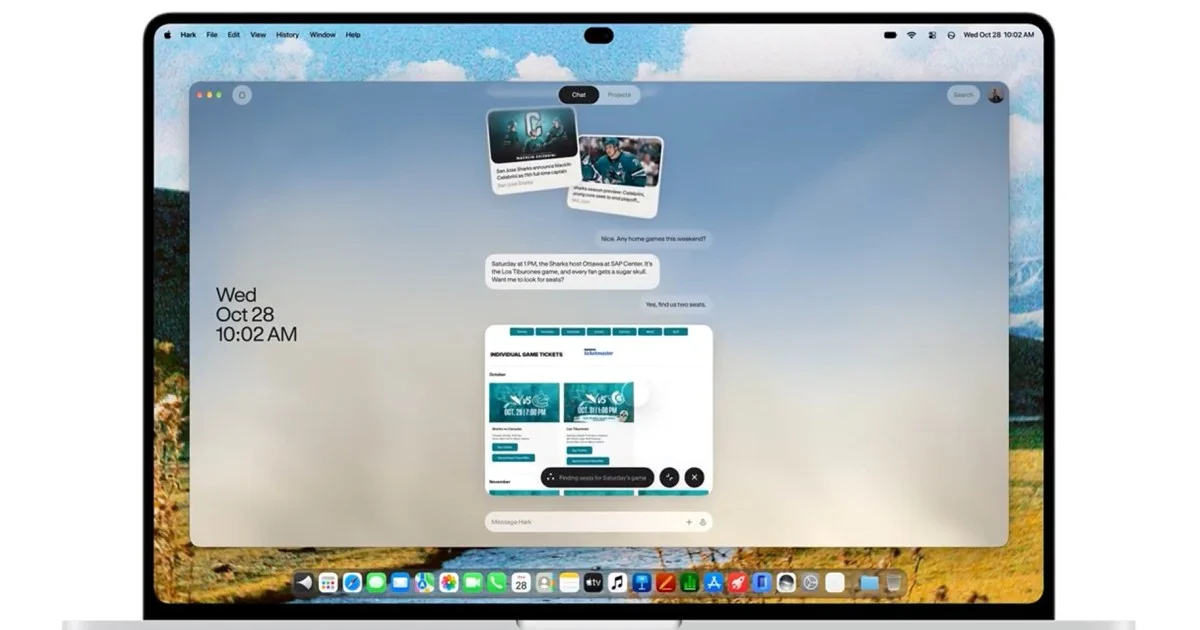
Hark, which launched its web, iOS, and Android versions earlier this month, brings its task-running capabilities directly to your desktop. This expansion means Mac users can now leverage the power of an AI agent designed to tackle the administrative burdens of modern life. The service operates through its own cloud computer, allowing it to perform actions on your behalf. By connecting your Google or Outlook accounts, Hark gains access to your emails and calendars, enabling it to proactively identify and suggest actions.
The core of Hark’s functionality lies in its “Handoff” agent, which can log into websites and complete transactions. Beyond direct commands, Hark aims to anticipate your needs. Its memory stores your preferences and past interactions, allowing for a more personalized experience. Suggested “Action Buttons” can pop up, offering to complete tasks like paying a bill or unsubscribing from a service you no longer use. The platform also introduces “Panels,” which are custom mini-applications you can create through chat. For instance, a Panel could display your fitness data from Strava and allow you to ask questions about your progress.
While the service is named “Hark Pro,” it offers a free tier that includes its full feature set. This means you can experience the core capabilities without an initial financial commitment. For users who require more extensive usage, subscription tiers like Hark Pro² and Pro³ offer increased allowances for a monthly fee. However, the exact numerical allowance for free users is not detailed, making it challenging to gauge whether it’s sufficient for daily reliance or just occasional errands.
Understanding Hark’s Capabilities
Hark’s primary function is to act as an agent that can perform tasks on your behalf. This is achieved through a sophisticated AI that understands your requests and interacts with various online services. The system is designed to be intuitive, allowing users to delegate tasks that would otherwise consume valuable time.
Signing In and Making Purchases: One of Hark’s key features is its ability to log into websites. This can be particularly useful for services where you frequently need to access your account but find the login process tedious. More significantly, Hark can make purchases on your behalf. This capability requires a high degree of trust and careful configuration, as it involves financial transactions. Users must grant Hark the necessary permissions, and the system is designed to ask for confirmation before proceeding with purchases, unless a specific category of task has been pre-authorized to run without explicit approval.
Email and Calendar Integration: Connecting Hark to your Google or Outlook accounts unlocks a deeper level of integration. With access to your email and calendar, Hark can monitor your communications and schedule. This allows it to identify upcoming appointments, deadlines, or even potential issues that require attention. For example, it might notice a flight confirmation email and offer to add the details to your calendar or check you in for your flight. Similarly, it could flag an upcoming bill payment and suggest Hark handle it.
Proactive Task Identification: Hark doesn’t just wait for commands; it aims to be proactive. Its memory system is designed to learn your habits, preferences, and the context of your digital life. This learning allows Hark to anticipate tasks you might need done. For instance, if you frequently cancel unused subscriptions, Hark might notice a recurring charge for a service you haven’t used and suggest canceling it. This predictive capability is a significant aspect of its utility, aiming to reduce the mental load of managing various online accounts and services.
Action Buttons and Panels: To make interaction more efficient, Hark employs “Action Buttons” and “Panels.” Action Buttons are contextual prompts that appear when Hark identifies a task you might want to complete. These buttons offer a one-click solution for common actions, such as paying a bill, confirming an appointment, or unsubscribing from a newsletter. They streamline the process of approving tasks, requiring minimal user input.
“Panels” represent a more customizable aspect of Hark. These are essentially mini-applications that you can describe through chat. For example, you could ask Hark to create a Panel that displays your workout data from a fitness tracker like Strava. Once created, you can interact with this Panel to ask specific questions about your performance, such as “How many miles did I run last week?” or “What was my average pace in my last 5k?” This feature allows for tailored data visualization and interaction without needing to navigate separate applications.
The “Free” Tier: What to Expect
Hark’s pricing model includes a free tier, which is a significant draw for users looking to explore AI assistance without immediate cost. The company states that the free tier offers the “full feature set,” meaning you get access to all the core functionalities of the service. This includes the ability to delegate tasks, connect email and calendar accounts, and utilize the proactive suggestions and Action Buttons.
However, the practical limitations of the free tier are not explicitly defined in terms of usage allowances. The absence of a numerical limit on tasks or interactions makes it difficult to assess how much you can realistically accomplish. It’s possible that the free tier is designed for occasional use or for users who have relatively light task management needs. For those who plan to rely on Hark for more frequent or complex errands, the paid subscription tiers—Hark Pro² and Hark Pro³—would likely be necessary. These tiers offer increased usage allowances, with Pro² providing twice the base allowance and Pro³ offering ten times as much. Without clear figures for the free tier, users are encouraged to try it out with smaller tasks to understand its capacity before committing to a paid plan.
Considerations for Mac Users
When you decide to delegate tasks to an AI assistant like Hark, you are essentially granting it access to your personal accounts and data. This raises important considerations regarding privacy and security, especially for Mac users.
Granting Account Access: Hark’s ability to perform tasks often requires it to sign in to your accounts. This includes email, calendars, and potentially financial or shopping websites. The company’s privacy policy outlines how it handles this access. It generally states that Hark will ask for permission before sending messages or making purchases, unless you have explicitly authorized that category of task to proceed without confirmation. It is crucial for users to carefully review these permissions and understand what level of autonomy they are giving Hark.
Data Privacy: Hark’s privacy policy is a key document for understanding how your data is used and protected. It’s important to note that certain features, particularly those related to memory and personalization, may not be available in all regions. For instance, the research indicates that memory functionality is not available in the European Economic Area, the U.K., or Switzerland. Mac users should check the latest privacy policy and regional availability for features they intend to use.
Starting with Small Tasks: Given the sensitive nature of granting access to accounts, a prudent approach for Mac users is to start with the free tier and small, easily verifiable tasks. This allows you to build trust in the system and understand its behavior before entrusting it with more significant responsibilities, such as booking flights or managing financial transactions. The official download for Hark for macOS is available on the company’s website, hark.com/mac.
How Hark Compares to Other AI Assistants
The landscape of AI assistants is rapidly expanding, with various tools offering different strengths and functionalities. Hark enters this space with a focus on task execution and proactive assistance, distinguishing itself from more conversational or purely generative AI models.
Focus on Task Execution: Unlike AI chatbots that primarily generate text, answer questions, or create content, Hark is built around the concept of “doing.” Its Handoff agent is designed to interact with websites and services to complete specific actions. This makes it more akin to a virtual personal assistant that can execute real-world tasks online. Other AI assistants might help you draft an email, but Hark can potentially send it or even manage the follow-up actions related to it.
Proactive Assistance and Memory: A key differentiator for Hark is its emphasis on proactive assistance powered by its memory. By learning user preferences and context, Hark aims to anticipate needs and suggest actions before being explicitly asked. This contrasts with many AI assistants that operate on a purely reactive model, waiting for user prompts. The ability to remember past interactions and preferences allows Hark to offer more personalized and relevant suggestions over time.
Comparison with Desktop Assistants: Hark for Mac joins a growing category of AI tools designed for desktop integration. For example, MacPaw’s Eney assistant is another option available for Apple devices. While specific feature comparisons can vary, Hark’s approach of using a cloud-based agent for task execution and its proactive suggestion system are notable aspects. Other AI tools might focus on system optimization, file management, or creative tasks, whereas Hark’s core mission appears to be streamlining everyday digital errands.
Integration with Productivity Tools: Hark’s ability to connect with email and calendar services like Google and Outlook places it within the broader ecosystem of productivity tools. This integration allows it to tap into existing workflows and provide assistance where it’s most needed. While some AI assistants might offer standalone functionalities, Hark’s integration capabilities suggest a goal of becoming a central hub for managing digital tasks.
The Role of “Panels”: The introduction of “Panels” offers a unique way for users to create custom interfaces for interacting with their data. This feature allows for a level of personalization not commonly found in general-purpose AI assistants. By enabling users to describe and build mini-apps through chat, Hark provides a flexible platform for data visualization and interaction tailored to individual needs.
The Future of AI Assistants in Daily Life
The development of AI assistants like Hark signals a shift in how we interact with technology and manage our daily lives. As AI becomes more sophisticated, its role is moving beyond simple information retrieval to active participation in completing tasks.
Increased Automation of Mundane Tasks: Hark’s ability to handle tasks like signing into websites, making purchases, and managing subscriptions points towards a future where many mundane digital chores are automated. This frees up human users to focus on more complex, creative, or strategic activities that require human judgment and ingenuity. The more AI can handle the routine, the more time individuals have for higher-value work and personal pursuits.
Personalization and Predictive Capabilities: The trend towards personalization, exemplified by Hark’s memory feature, is likely to continue. AI assistants will become better at understanding individual users, their habits, and their preferences. This will lead to more tailored experiences and proactive assistance that feels genuinely helpful rather than intrusive. Predictive capabilities will allow AI to anticipate needs and offer solutions before problems even arise.
The Evolving Human-AI Partnership: The relationship between humans and AI is evolving from one of command and control to a more collaborative partnership. AI assistants like Hark are not just tools; they are becoming collaborators that can share the workload. This partnership requires clear communication, trust, and a mutual understanding of capabilities and limitations. As AI becomes more integrated into our daily routines, the nature of work and personal management will undoubtedly change.
Ethical Considerations and Trust: As AI assistants gain more access to personal data and the ability to perform actions on our behalf, ethical considerations become paramount. Issues of privacy, data security, and algorithmic bias will need to be continuously addressed. Building and maintaining user trust will be essential for the widespread adoption of these powerful tools. Transparency in how AI systems operate and make decisions will be key to fostering this trust.
Accessibility and Inclusivity: The availability of free tiers for AI assistants like Hark is important for ensuring accessibility. As these technologies become more integrated into daily life, it’s crucial that they are available to a wide range of users, regardless of their financial situation. Furthermore, AI development should strive for inclusivity, ensuring that these tools are designed to benefit everyone and do not perpetuate existing societal inequalities.
Getting Started with Hark on Mac
For Mac users interested in exploring the capabilities of Hark, the process of getting started is straightforward. The application is available for download directly from the Hark website.
Download and Installation: Mac users can find the download link for Hark for macOS at hark.com/mac. Once the download is complete, follow the standard installation procedure for macOS applications. This typically involves dragging the application icon to your Applications folder.
Account Setup and Permissions: After installation, you will need to create a Hark account or log in if you already have one. During the setup process, Hark will guide you through connecting your email and calendar accounts (Google or Outlook). This is a critical step where you grant Hark the necessary permissions to access your data. Carefully review the permissions requested and ensure you are comfortable with them. You will also have the opportunity to configure settings related to privacy and how Hark interacts with your accounts, such as whether it should ask for confirmation before performing certain actions.
Exploring Features with the Free Tier: It is highly recommended to start by utilizing the free tier of Hark. Begin with simple tasks that are easy to monitor. For example, you could ask Hark to find an upcoming appointment in your calendar and confirm its details, or to identify a recurring subscription you might want to cancel. Observe how Hark performs these tasks, how it communicates with you, and whether its suggestions align with your expectations.
Gradually Increasing Complexity: As you become more familiar and comfortable with Hark’s performance, you can gradually increase the complexity of the tasks you delegate. This might involve asking Hark to research a product and compare prices, or to manage a simple online booking. Always keep an eye on the permissions you have granted and the actions Hark is taking. If at any point you feel uncomfortable with the level of access or the actions being performed, you can revoke permissions or adjust settings within the Hark application.
Understanding Limitations: Be aware of the limitations mentioned in the research, such as the regional restrictions on memory features. Also, understand that while Hark is powerful, it is still an AI and may occasionally make mistakes or misunderstand requests. It’s important to maintain a level of oversight, especially for tasks with significant consequences.
By following these steps, Mac users can effectively begin using Hark as their AI assistant, exploring its potential to streamline daily digital tasks and reduce their administrative workload.
Conclusion
Hark for Mac represents a significant step forward in making AI-powered task management accessible to a broader audience. By offering a free tier with its full feature set, the service allows users to experience the benefits of an AI assistant that can handle a variety of online errands. From managing emails and calendars to signing into websites and even making purchases, Hark aims to offload the time-consuming administrative tasks that often clutter our digital lives.
The proactive nature of Hark, driven by its memory and contextual understanding, sets it apart from many other AI tools. The ability to anticipate needs and offer actionable suggestions, coupled with features like Action Buttons and customizable Panels, creates a powerful and personalized user experience. For Mac users, this expansion brings a new level of convenience directly to their desktop, integrating seamlessly with their existing workflows.
However, as with any powerful tool that requires access to personal accounts and data, users must approach Hark with an understanding of its capabilities and limitations. Careful attention to privacy settings, permissions, and starting with simpler tasks are crucial steps for building trust and ensuring a secure experience. The ongoing development of AI assistants like Hark points towards a future where human-AI collaboration becomes increasingly common, transforming how we manage our time and interact with the digital world. By embracing these tools responsibly, users can unlock new levels of productivity and reclaim valuable time.



Conversation
0 Comments