

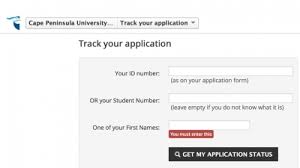
Have you applied to the Cape Peninsula University of Technology (CPUT) for the 2027 academic year? After submitting your application, the next important step is checking your CPUT online application status to track your admission progress.
This guide explains how to check your Cape Peninsula University of Technology application status for 2027, including the official direct links, login process, status meanings, and important applicant tips.
CPUT Application Status 2027 Portal
The Cape Peninsula University of Technology provides an online portal where applicants can monitor the progress of their undergraduate and postgraduate applications.
Official CPUT Application Status 2027 Link
CPUT Application Status Portal 2027
Applicants can also visit the official Cape Peninsula University of Technology website for admission updates, registration information, and academic resources.
How to Check CPUT Online Application Status 2027
Follow these simple steps to track your CPUT application status online:
Step 1: Visit the CPUT Status Portal
Open the official CPUT application tracking portal using the link above.
Step 2: Enter Your Information
Provide your:
- Student number OR
- South African ID number / Passport number
Step 3: Submit Your Details
Click the Submit or Track Application button.
Step 4: View Your Admission Status
Your current application status and admission progress will appear on the screen.
CPUT Application Status Meanings
Below are common admission status messages applicants may see:
| Status Message | Meaning |
|---|---|
| Application Received | Your application has been submitted successfully |
| Pending | Your application is still being processed |
| Provisionally Accepted | You meet the preliminary admission requirements |
| Accepted | You have been officially admitted |
| Awaiting Documents | Additional documents are required |
| Unsuccessful | Your application was not approved |
Required Documents for CPUT Applications
To avoid delays in processing your application, ensure you submitted all required documents, including:
- Certified copy of South African ID or passport
- Latest school results or academic transcripts
- Proof of residence
- Proof of application fee payment (if applicable)
- Programme-specific supporting documents
Incomplete applications may remain pending until all documents are received.
Forgot Your CPUT Login Details?
If you experience login issues:
- Double-check your student number or ID number
- Review your application confirmation email
- Contact the CPUT admissions office for assistance
Cape Peninsula University of Technology Contact Details
Cape Peninsula University of Technology (CPUT)
- Website: CPUT Official Website
- Application Status Portal: Check CPUT Application Status
Tips for CPUT Applicants
- Check your application status regularly
- Upload outstanding documents immediately
- Keep your application details safe
- Monitor your email for official communication from CPUT
- Follow registration instructions once accepted
Frequently Asked Questions (FAQs)
When will CPUT release 2027 application results?
CPUT releases admission updates in phases after reviewing applications and supporting documents.
Can I check my CPUT application status using my ID number?
Yes. Applicants can usually track their status using either their student number or South African ID/passport number.
What does “Provisionally Accepted” mean?
It means you currently meet the admission requirements, subject to final verification or submission of outstanding documents.
Is the CPUT application status portal available for postgraduate students?
Yes. Both undergraduate and postgraduate applicants can use the online application tracking portal.
Conclusion
Checking your Cape Peninsula University of Technology (CPUT) online application status for 2027 is easy through the official CPUT application portal. Monitoring your application regularly helps you stay informed about admission updates, missing documents, and registration deadlines.
Use the official CPUT application status link above to track your admission status anytime online.



Conversation
0 Comments