

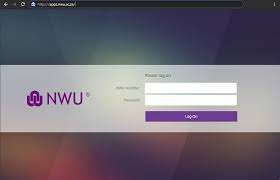
North-West University (NWU) Student Portal Guide – The North-West University student portal is the official online system where students manage academics, registration, finances, and campus services. It’s an essential platform used daily by both new and returning students.
🎓 Official NWU Student Portal Links
- Main Website: https://www.nwu.ac.za/
- Student Portal Login (MySIS): http://studies.nwu.ac.za/
- User Login Page: https://www.nwu.ac.za/user/login
- Student Services Hub: https://www.nwu.ac.za/content/nwu-current-students
What Is the NWU Student Portal?
The NWU student portal (also called MySIS / Student Self-Service) is a digital platform that allows students to perform important academic and administrative tasks online.
Through this system, students can:
- Register for courses
- Check results and academic records
- Pay fees
- Track admission status
- Access timetables and academic calendars
What You Can Do on the NWU Portal
📚 Academic Services
- Course/module registration
- View class timetables
- Access exam schedules
- Check results and transcripts
- Download proof of registration
The portal also connects you to academic resources like yearbooks, timetables, and exam info.
💰 Financial Services
- View tuition fees and balances
- Make payments
- Track financial aid or bursaries
- Access account statements
🧾 Student Administration
- Update personal details
- Track application/admission status
- Submit academic requests
- Manage registration changes
🏫 Campus & Student Resources
- Access student email (Microsoft Outlook)
- View academic calendars
- Career services and job opportunities
- Campus announcements and updates
How to Access the NWU Student Portal
Method 1: Direct Login
- Visit 👉 http://studies.nwu.ac.za/
- Enter your:
- Student Number / Username
- Password (SIS password)
- Click Login
Method 2: Via Main Website
- Go to 👉 https://www.nwu.ac.za/
- Click Current Students
- Select Student Portal / Account Enquiries
- Log in with your credentials
Login Details You Need
- Username: [email protected]
- Password: SIS password (created or provided during registration)
👉 Important:
- Do NOT use your student email (mynwu.ac.za) to log into the portal
- Use only your MySIS login credentials
First-Time Login (New Students)
- Your login credentials are sent to:
- Your application email
- Your NWU student email
- Default password may be based on your ID or passport number
- You must change your password after first login
Forgot Password or Login Issues
If you can’t log in:
- Click “Forgot Password” on the login page
- Follow verification steps via email
- Use a private/incognito browser if login conflicts occur
Important Tips for NWU Students
- Always use official NWU links (avoid fake portals)
- Keep your login details secure
- Check your portal regularly for updates
- Use your NWU email for official communication
Common Problems & Solutions
🔴 Portal not opening?
- Clear browser cache
- Try another browser
- Check your internet connection
📚 Courses not visible?
- Ensure registration is complete
- Wait for system updates
💳 Registration blocked?
- Check outstanding fees or missing documents
Why the NWU Portal Is Important
The portal is your academic control center. You’ll use it for:
- Registration
- Course access
- Assignment submissions
- Fee payments
- Viewing results
Without it, you risk missing deadlines and key academic updates.
🔗 Quick Access Summary
- Student Portal (MySIS): http://studies.nwu.ac.za/
- User Login Page: https://www.nwu.ac.za/user/login
- Main Website: https://www.nwu.ac.za/
Final Thoughts
If you’re studying at North-West University, make the student portal part of your daily routine. It keeps you organized, informed, and in control of your academic journey.
Conversation
0 Comments