

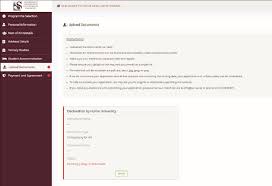
Are you applying to Stellenbosch University (SU) for the 2027 academic year? One of the most important steps in completing your application is uploading all required supporting documents through the official SU online application portal.
This guide explains how to upload documents for the Stellenbosch University online application 2027, including the official upload link, required documents, step-by-step instructions, and important application tips.
Stellenbosch University Document Upload Portal 2027
Stellenbosch University allows applicants to upload supporting documents online through its official admissions portal.
Official Stellenbosch University Document Upload Link 2027
Stellenbosch University Online Application Portal 2027
Applicants can also visit the official Stellenbosch University website for admission updates, faculty requirements, and registration information.
How to Upload Documents for SU Application 2027
Follow these simple steps to upload your supporting documents successfully:
Step 1: Visit the SU Online Application Portal
Open the official Stellenbosch University application portal using the link above.
Step 2: Login to Your Applicant Account
Enter your:
- Username or student number
- Password created during registration
Then click Login.
Step 3: Access the Document Upload Section
After logging in:
- Navigate to the Application Documents section
- Or select Upload Supporting Documents
Step 4: Upload Your Required Documents
Choose and upload clear scanned copies of your required documents in accepted formats such as PDF, JPG, or PNG.
Step 5: Submit Your Documents
Before final submission:
- Review all uploaded documents carefully
- Ensure files are readable and correctly uploaded
- Confirm that all required documents are attached
Click Submit or Save to complete the upload process.
You may receive a confirmation email or notification after successful submission.
Required Documents for Stellenbosch University Application 2027
Applicants are usually required to upload the following documents:
| Required Document | Description |
|---|---|
| South African ID or Passport | Certified copy of identification |
| Grade 11 or Grade 12 Results | Latest academic results |
| Academic Transcripts | For transfer or postgraduate applicants |
| Proof of English Proficiency | For international students |
| Proof of Application Fee Payment | If applicable |
| Additional Programme Documents | Portfolio, CV, or research proposal for selected programmes |
Always confirm specific programme requirements on the SU admissions portal.
Important Tips for Uploading Documents
To avoid delays in your application processing:
- Upload certified and clear copies only
- Ensure documents are scanned properly
- Use accepted formats like PDF, JPG, or PNG
- Name your files correctly before uploading
- Submit all documents before the application deadline
- Double-check uploaded files before submission
Incomplete applications may delay admission decisions.
Common Problems When Uploading Documents
Here are common upload problems and possible solutions:
| Problem | Solution |
|---|---|
| File too large | Compress the document size |
| Unsupported format | Convert files to PDF or JPG |
| Login issues | Reset your password or contact support |
| Upload not saving | Refresh the page and try again |
| Poor scan quality | Rescan the documents clearly |
Stellenbosch University Contact Information
Stellenbosch University (SU)
- Website: Stellenbosch University Official Website
- Online Application Portal: SU Application Portal 2027
Frequently Asked Questions (FAQs)
Can I upload documents after submitting my SU application?
Yes. Applicants can usually log back into the portal to upload outstanding documents before the closing date.
What file formats does Stellenbosch University accept?
SU commonly accepts PDF, JPG, and PNG file formats.
Can I upload documents using my smartphone?
Yes. You can upload documents using a smartphone, tablet, or computer with internet access.
What should I do if I uploaded the wrong document?
Log back into the portal and replace the incorrect file if the editing option is available.
Conclusion
Uploading your supporting documents correctly is an essential part of completing your Stellenbosch University (SU) online application for 2027. Ensuring your documents are clear, certified, and submitted on time can improve your chances of successful admission.
Use the official Stellenbosch University document upload portal link above to complete your application process quickly and securely.

Conversation
0 Comments