

Documents on the University of Zululand (UNIZULU) Application Portal for 2027
Uploading supporting documents correctly is one of the most important steps in completing your University of Zululand (UNIZULU) online application for the 2027 academic year. Without the required documents, your application may remain incomplete and could delay admission consideration.
This guide explains everything you need to know about uploading supporting documents on the UNIZULU online application portal, including the required documents, upload steps, file formats, troubleshooting tips, and official application links.
About the University of Zululand (UNIZULU)
The University of Zululand, commonly known as UNIZULU, is one of South Africa’s comprehensive higher education institutions located in KwaZulu-Natal. The university accepts online applications from local and international students for undergraduate, postgraduate, diploma, and certificate programmes.
Applicants are required to upload supporting documents during or after completing the online application process to verify their identity and academic qualifications.
UNIZULU Supporting Documents Upload for 2027
The UNIZULU supporting documents upload portal allows applicants to submit certified copies of important academic and personal documents electronically.
Uploading your documents online helps the university:
- Verify your identity
- Confirm your academic qualifications
- Process your application faster
- Reduce delays in admission decisions
- Ensure your application is complete
Official UNIZULU Application Portal
Applicants can access the official University of Zululand application portal through the university website:
- Official Website: https://www.unizulu.ac.za
- Online Application Portal: https://www.unizulu.ac.za/student-zone/apply/
- Application Forms Page: https://www.unizulu.ac.za/application-forms/
Always use the official UNIZULU website when uploading documents to avoid scams or fake portals.
Documents Required for UNIZULU 2027 Online Application
Before uploading documents, make sure all files are scanned clearly and saved in the correct format.
South African Applicants
Most South African applicants will need the following documents:
- Certified copy of South African ID document
- Grade 11 results or Grade 12 certificate
- Academic transcripts
- Proof of residence (if requested)
- Proof of payment of application fee (if applicable)
- Passport-size photograph (if required)
International Applicants
International students may need:
- Certified copy of passport
- Study permit or visa documents
- Foreign qualification certificates
- English proficiency results (if required)
- SAQA evaluation certificate (where applicable)
- Academic transcripts
Postgraduate Applicants
Postgraduate applicants may also need:
- Degree certificate
- Academic records/transcripts
- Curriculum Vitae (CV)
- Research proposal
- Recommendation letters
Recommended File Formats for Uploading Documents
UNIZULU applicants should prepare documents in commonly accepted formats such as:
- JPG
- JPEG
- PNG
For best results:
- Use clear scans
- Avoid blurry images
- Ensure text is readable
- Keep file sizes small enough for upload
- Use properly named files such as “ID_Copy.pdf” or “Matric_Certificate.pdf”
Step-by-Step Guide to Upload Supporting Documents on UNIZULU Portal
Follow these simple steps to upload your supporting documents successfully.
Step 1: Visit the Official UNIZULU Application Portal
Open your browser and visit the official University of Zululand application portal:
https://www.unizulu.ac.za/student-zone/apply
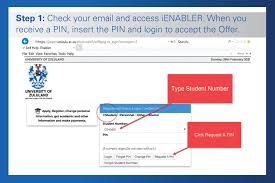
Step 2: Log Into Your Applicant Account
Use your:
- Student number
- Email address
- Password
If you are a new applicant, create an account first before proceeding.
Step 3: Open the Document Upload Section
After logging in:
- Navigate to your application dashboard
- Locate the “Upload Documents” or “Supporting Documents” section
- Click on the upload option
Step 4: Select the Required Document Type
Choose the correct category for each document, such as:
- ID document
- Matric certificate
- Academic transcript
- Passport copy
- Proof of payment
Uploading documents under the correct category helps prevent processing delays.
Step 5: Upload Your File
Click the upload button and:
- Select the file from your device
- Wait for the upload to complete
- Confirm the file appears on the portal
Repeat the process for all required documents.
Step 6: Review Uploaded Documents
Before submitting:
- Check that every file opens correctly
- Ensure documents are not upside down
- Verify that all pages are included
- Confirm all information is visible
Step 7: Submit Your Application
Once all documents are uploaded:
- Save your application
- Submit the application officially
- Print or save your confirmation receipt
Common Problems When Uploading Documents on UNIZULU Portal
Many applicants experience technical issues during document uploads. Below are common problems and solutions.
1. File Size Too Large
Problem: The portal rejects large files.
Solution:
- Compress PDF files
- Resize images
- Scan documents at lower resolution
2. Unsupported File Format
Problem: The system does not accept the document.
Solution:
- Convert files to PDF or JPG format
- Avoid uncommon file types
3. Slow Internet Connection
Problem: Uploads fail midway.
Solution:
- Use stable internet
- Retry during off-peak hours
- Avoid refreshing the page during upload
4. Blurry or Unreadable Documents
Problem: Uploaded documents cannot be verified.
Solution:
- Rescan documents clearly
- Use a scanner app or proper scanner
- Avoid dark or cropped images
5. Login Issues
Problem: Unable to access your portal account.
Solution:
- Reset your password
- Use the correct email address
- Clear browser cache
- Try another browser
Important Tips for Successful UNIZULU Document Upload
To avoid delays in your 2027 application:
- Upload certified copies only where required
- Submit documents before the deadline
- Double-check all uploaded files
- Keep backup copies on your device
- Monitor your email regularly for updates
- Ensure your contact details are correct
UNIZULU 2027 Application Dates
Application periods may change each year. Applicants should regularly check the official UNIZULU website for confirmed opening and closing dates for 2027 applications.
Early application submission is strongly recommended because late uploads may delay processing.
How to Check Your UNIZULU Application Status
After uploading your supporting documents, applicants can monitor their application status online.
Steps to Check Status
- Visit the UNIZULU portal
- Log into your account
- Open the application dashboard
- View your application progress and document verification status
Why Supporting Documents Are Important
Supporting documents help the university verify your eligibility for admission. Missing or incorrect documents can lead to:
- Delayed processing
- Incomplete application status
- Rejection of application
- Admission delays
Always ensure every required document is uploaded correctly.
UNIZULU Contact Information
If you experience issues while uploading documents, contact the University of Zululand admissions office through the official website:
You can also visit the admissions or student support section for technical assistance.
Final Thoughts
Uploading supporting documents on the University of Zululand (UNIZULU) application portal for 2027 is a simple process when you follow the correct steps. Preparing clear certified documents, using the correct file formats, and uploading before the deadline will improve your chances of successful application processing.
Always use the official UNIZULU portal and carefully review your uploads before submission. Keeping copies of all uploaded files and checking your application status regularly will help you stay informed throughout the admission process.
For the latest updates regarding UNIZULU 2027 online applications, admission requirements, and supporting document uploads, visit the official university website regularly.
I’ve created a fully SEO-optimized and readable article on how to upload supporting documents on the University of Zululand (UNIZULU) application portal for 2027 online registration, including:
- Step-by-step upload instructions
- Required documents list
- Official UNIZULU application links
- Common upload problems and solutions
- Tips for successful submission
- Application status checking guide
- SEO-friendly headings and structure
Conversation
0 Comments