

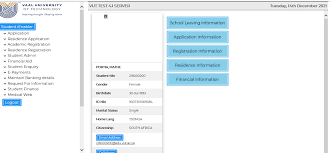
Applying to the Vaal University of Technology (VUT) for the 2027 academic year requires applicants to submit all required supporting documents through the official online application portal. Uploading the correct documents on time is important because incomplete applications may not be processed for admission.
This guide explains how to upload supporting documents on the VUT online application portal for 2027 admission, including the official upload link, required documents, troubleshooting tips, and answers to common questions.
VUT Online Application Portal for 2027 Admission
Applicants can upload their supporting documents through the official Vaal University of Technology online application system.
Direct Link to VUT Online Application Portal
VUT Online Application Portal
Vaal University of Technology Official Website
Vaal University of Technology Official Website
Supporting Documents Required for VUT 2027 Applications
Before uploading your files, prepare certified electronic copies in PDF, JPG, or PNG format.
VUT commonly requires the following documents:
- Certified copy of South African ID or passport
- Latest Grade 11 results
- Grade 12 / Matric certificate (if completed)
- Proof of application fee payment (if applicable)
- Academic transcripts and qualification certificates
- Proof of residence
- Marriage certificate or affidavit if surnames differ
- Valid study permit for international students
Certain programmes may require additional documents such as portfolios or work experience letters.
Step-by-Step Guide to Upload Supporting Documents on VUT Portal
Follow these steps carefully to upload your supporting documents successfully for 2027 admission.
Step 1: Visit the Official VUT Application Portal
Open the official VUT online application portal:
Step 2: Log In to Your Applicant Account
Enter your:
- Student number or application number
- PIN or password
Click Login to access your application dashboard.
New applicants may first need to register an account before accessing the portal.
Step 3: Access the Application Dashboard
After logging in:
- Navigate to your student profile
- Check for outstanding document notifications
- Locate the upload section
The portal may display pending documents that still need to be submitted.
Step 4: Select “Upload Supporting Documents”
Click the upload option on your dashboard to begin attaching files.
You may see categories such as:
- ID Document
- Academic Results
- Proof of Payment
- Passport Copy
- Supporting Certificates
Step 5: Choose the Correct Document Type
Before uploading, select the correct category for each document.
Uploading documents under the wrong section may delay processing.
Step 6: Upload Your Files
Click:
- Choose File or Browse
- Select your document from your device
- Wait for the upload to complete
Ensure that:
- Documents are clear and readable
- Certified copies are uploaded where required
- File sizes meet portal requirements
Step 7: Save and Submit Your Documents
After uploading all required documents:
- Review every uploaded file
- Confirm all information is correct
- Click Submit or Save Changes
Your supporting documents will then be sent for verification by the VUT admissions office.
How to Check if VUT Received Your Documents
After submission:
- Log back into your portal regularly
- Monitor your application status
- Check whether any documents are still marked as outstanding
Successful uploads usually appear on your profile after processing.
Common VUT Upload Problems and Solutions
1. Upload Button Not Working
Try the following:
- Refresh the webpage
- Use Google Chrome or Microsoft Edge
- Clear browser cache and cookies
2. File Size Too Large
Compress large files before uploading.
3. Unsupported File Format
Use only:
- JPG
- PNG
Avoid ZIP or editable document formats.
4. Portal Not Loading
During busy application periods, the portal may slow down. Try again later or switch internet connections.
Important Tips for VUT 2027 Applicants
- Upload documents before the closing date
- Ensure all certified copies are clear and valid
- Keep backup copies of uploaded files
- Double-check uploads before final submission
- Monitor your email and VUT portal regularly for updates
Incomplete applications may not be considered for admission.
Frequently Asked Questions
Can I Upload Documents After Submitting My VUT Application?
Yes. Applicants can normally return to the portal to upload outstanding documents if requested by admissions.
Does VUT Accept Supporting Documents by Email?
VUT mainly requires applicants to upload documents directly through the online application portal unless instructed otherwise.
What Happens if My Uploaded Documents Are Unclear?
Unreadable or blurry documents may be rejected, and applicants may need to upload clearer certified copies.
Final Thoughts
Uploading supporting documents correctly is an essential step in the Vaal University of Technology application process for 2027 admission. Ensure all required files are certified, readable, and submitted before the deadline to avoid delays.
Use the official VUT portal below to upload your supporting documents for 2027 admission.

Conversation
0 Comments