

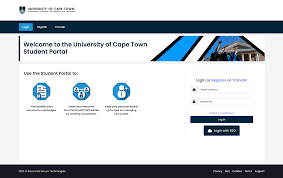
University of Cape Town (UCT) Student Portal: Everything You Need to Know
The University of Cape Town student portal is the main online platform where students manage academics, finances, registration, course materials, and campus information. If you’re a new or current student, this portal is basically your digital campus office.
Official UCT Student Portal Links
- UCT Main Website: University of Cape Town Official Website
- Students Portal/Home: UCT Students Portal
- Applicants & Students Page: UCT Applicants and Students
What You Can Do on the UCT Student Portal
Once logged in, students can access:
1. Academic Services
- Course registration and enrollment
- View class timetable
- Access lecture notes and study materials
- Submit assignments online
- Check exam schedules
- View academic records and grades
UCT uses Vula, its online learning management system, for coursework, assignments, announcements, and collaboration.
2. Financial Services
- Check tuition fee balance
- Download fee statements
- Make fee payments
- View bursary or scholarship details
3. Student Administration
- Update personal details
- Download proof of registration
- Request transcripts
- Track applications and admission status
4. Campus Resources
- Student housing information
- Library access
- Student wellness services
- Student support and counseling
- Sports clubs and societies
How to Access the UCT Student Portal
Follow these steps:
- Visit the official student portal:
https://www.student.uct.ac.za/ (also available via the official links above) - Click Login or navigate to the portal/Vula system.
- Enter:
- Student Number or UCT Username
- Password / Network Password
- Click Sign In
If You Forgot Your Password
If you can’t log in:
- Use the password reset option on the login page
- Contact UCT ICTS Helpdesk for account recovery support
Important Tips for New Students
- Keep your student number safe
- Use only official UCT websites (avoid third-party portals for login)
- Check the portal regularly for registration deadlines, results, and announcements
- Enable email notifications from your UCT student email
Common Issues Students Face
Portal not opening?
- Clear browser cache
- Try Chrome or Firefox
- Check internet connection
Can’t access courses?
- Ensure registration is completed
- Wait for faculty/course activation
Fees hold blocking registration?
- Check financial status on your portal and clear outstanding balances
Why UCT Students Should Use the Portal Often
The portal is essential because almost everything at UCT is handled online—from registration to exam results and communication with lecturers.
Without portal access, students may miss:
- Registration deadlines
- Assignment submissions
- Fee deadlines
- Exam schedules
- Important announcements
Quick Access Links
- Student Portal: Open UCT Student Portal
- Applicants Portal: UCT Applicants Portal
- UCT Website: University of Cape Town Homepage
If you’re applying to UCT or already admitted, bookmarking these links is a smart move.
Forgot Your Password?
If you can’t log in:
Option 1
Use the password reset option on the login page.
Option 2
Contact UCT ICTS Helpdesk for assistance.
Common Login Problems and Fixes
Wrong Password
Double-check:
- Caps Lock
- Student number
- Updated password
Portal Not Loading
Try:
- Clearing browser cache
- Using Chrome or Firefox
- Switching internet connection
Account Locked
Contact UCT student support/ICT helpdesk.
Important Tips for New UCT Students
Use Only Official Links
Avoid random third-party sites.
Always verify the website ends with:
uct.ac.za
Check Portal Daily
Important updates are posted frequently, including:
- Assignment deadlines
- Exam schedules
- Faculty notices
Keep Login Details Safe
Never share your student credentials.
If you’re applying to UCT or already admitted, your first step should be checking your admission email for your student number and login instructions.

Conversation
0 Comments