

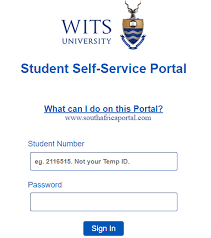
University of the Witwatersrand (Wits) Student Portal Guide.
The University of the Witwatersrand student portal is the central online hub where students manage academics, registration, finances, and campus services. Whether you’re a new applicant or a returning student, understanding how to use this system will save you time and stress.
Official Wits Student Portal Links
- Main Website: https://www.wits.ac.za/
- Student Self-Service Portal: https://self-service.wits.ac.za/
- Wits Student Portal Hub: https://www.wits.ac.za/students/
- Learning Platform (ulwazi): https://ulwazi.wits.ac.za/
What You Can Do on the Wits Student Portal
🎓 Academic Management
- Register for courses and modules
- View class timetable
- Access exam schedules
- Check results and academic records
- Download proof of registration
Wits uses ulwazi (its learning management system) where students:
- Access lecture notes and materials
- Submit assignments
- Participate in discussions
- Receive announcements from lecturers
💰 Financial Services
- View tuition fees and balances
- Download fee statements
- Make payments
- Track bursaries and scholarships
🧾 Student Administration
- Update personal information
- Track admission/application status
- Request academic transcripts
- Manage course changes
🏫 Campus & Student Support
- Access library services
- Apply for student accommodation
- Get health and counseling support
- Join student organizations and activities
How to Access the Wits Student Portal
Follow these steps:
- Go to the official login page:
https://self-service.wits.ac.za/ - Enter your login details:
- Student Number
- Password
- Click Sign In to access your dashboard
How to Access ulwazi (Learning System)
- Visit: https://ulwazi.wits.ac.za/
- Log in using:
- Wits username (e.g., [email protected])
- Password
Forgotten Password or Login Issues
If you can’t log in:
- Use the password reset option on the login page
- Contact Wits ICT Helpdesk
- Ensure your account is activated after registration
Tips for New Wits Students
- Always use official Wits links to avoid scams
- Check your portal daily for updates and deadlines
- Activate your Wits email—it’s the main communication channel
- Complete registration early to access all systems
Common Problems & Solution
🔴 Cannot log in?
- Double-check your student number
- Reset your password
- Try a different browser (Chrome recommended)
📚 Courses not showing?
- Confirm registration is complete
- Wait for faculty activation
💳 Registration blocked?
- Check outstanding fees and settle balances
Why the Wits Student Portal Is Important
The portal is essential for:
- Course registration
- Assignment submissions
- Viewing results
- Paying fees
- Receiving university updates
Missing access means missing critical academic deadlines.
Quick Access Summary
- Self-Service Portal: https://self-service.wits.ac.za/
- Student Hub: https://www.wits.ac.za/students/
- ulwazi LMS: https://ulwazi.wits.ac.za/
Final Advice
If you’re studying at University of the Witwatersrand, make the student portal your daily tool. It’s where everything important happens—academically and administratively.
Keep Login Details Safe
Never share your student credentials.
If you’re applying to WITS or already admitted, your first step should be checking your admission email for your student number and login instructions.

Conversation
0 Comments