

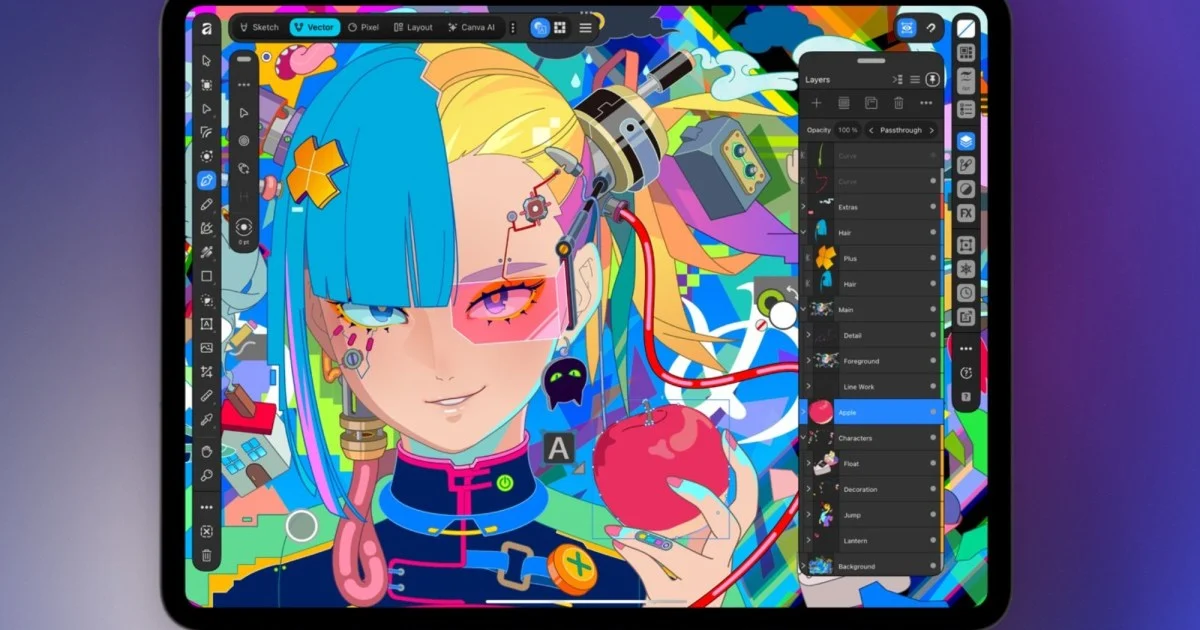
Affinity for iPad: A Unified Creative Powerhouse Arrives
For years, creative professionals and hobbyists have juggled multiple applications to bring their visions to life on their iPads. Photo editing, vector design, page layout, and digital sketching often required switching between different apps, disrupting workflow and limiting creative flow. This fragmentation is now a thing of the past with the arrival of Affinity’s unified creative suite for iPad. This new application brings together the robust capabilities of Affinity Photo, Designer, and Publisher into a single, seamless experience, offering a powerful and accessible platform for a wide range of creative tasks.
The new Affinity app for iPad represents a significant step forward, consolidating powerful tools into one intuitive interface. It’s designed to work harmoniously with Apple Pencil and the iPad’s touchscreen, unlocking new levels of precision and creative expression. The core functionality of this all-in-one creative suite is available for free, making professional-grade design tools more accessible than ever. This move by Affinity aims to democratize digital creation, allowing more users to explore their artistic potential without the barrier of high costs for essential features.
Unifying the Creative Workflow
Previously, iPad users had to rely on separate Affinity applications for different creative needs. If you were editing photos, you’d open Affinity Photo. For vector graphics, it was Affinity Designer. And for page layout and publishing, Affinity Publisher was the go-to. While each app was powerful in its own right, the need to switch between them for different stages of a project could be cumbersome. This new unified app eliminates that friction by integrating all these functionalities into a single download.
This consolidation means that a designer can start with a vector illustration in the Designer persona, seamlessly transition to the Photo persona to incorporate photographic elements, and then move to the Publisher persona to arrange everything into a multi-page document, all within the same application. This integrated approach not only saves time but also allows for a more fluid and intuitive creative process. The ability to work on illustrations, photos, vectors, and page layouts without ever leaving the app is a game-changer for iPad-based creative workflows.
Enhanced Apple Pencil Integration
The iPad’s touch interface and Apple Pencil have always been powerful tools for digital art and design. Affinity’s new app takes full advantage of these capabilities, introducing features specifically designed to enhance the drawing and sketching experience. The introduction of Sketch Studio provides a dedicated workspace optimized for drawing with Apple Pencil, offering support for pressure and tilt controls. This allows for a more natural and expressive drawing feel, mimicking traditional art tools with remarkable accuracy.
Beyond the nuanced control offered by pressure and tilt, the app introduces innovative features like Sketch to Shapes. This tool can transform rough, hand-drawn sketches into clean, editable vector shapes. This is incredibly useful for quickly blocking out ideas or creating logos and icons without the need for painstaking redrawing. For users with the latest Apple Pencil Pro, Affinity’s app supports advanced features such as barrel roll, squeeze gestures, and hover capabilities. These additions provide even more ways to interact with the digital canvas, offering shortcuts and dynamic control that can speed up the design process and add new dimensions to creative work.
Advanced Tools for Precision and Detail
Affinity’s commitment to providing professional-grade tools is evident in the advanced features available within the new app. The Mask Tool, for instance, is a powerful asset for photo editing, particularly for making complex selections. It excels at isolating intricate details like hair and fur, which are notoriously difficult to mask accurately in other applications. This level of precision is essential for professional photo retouching and compositing.
Furthermore, the app supports editing RAW photos directly, preserving the maximum amount of image data for greater flexibility in post-processing. This is a critical feature for photographers who want to maintain the highest quality in their work. The ability to create and manage multi-page documents within the same file structure, using the .af file format, ensures that all edits and elements remain organized and accessible. This unified file format simplifies project management and collaboration, as all components of a design are contained within a single, manageable file.
The Power of AI: Canva AI Studio
In addition to its core creative tools, the new Affinity app integrates Canva AI Studio, bringing a suite of artificial intelligence-powered editing features to the platform. These AI tools are designed to automate complex tasks, enhance image quality, and unlock new creative possibilities. Generative Expand allows users to extend the boundaries of their images, seamlessly adding new content that blends with the existing composition. This is invaluable for reframing shots or creating wider aspect ratios.
Image upscaling is another key AI feature, enabling users to increase the resolution of images without significant loss of quality, making lower-resolution assets usable in high-definition projects. For photographers, the AI-powered motion blur reduction and noise reduction tools can salvage images that might otherwise be unusable due to camera shake or low-light conditions. The Decompose Layer tool is particularly innovative, capable of splitting a flattened image into separate, editable layers. This can be incredibly useful for extracting elements from existing artwork or simplifying complex compositions for further manipulation.
Pricing and Accessibility: A Freemium Model
A significant aspect of Affinity’s new iPad app is its pricing structure. The core creative tools, including the Sketch, Vector, Pixel, and Layout functionalities, are offered completely free for individual users. This move dramatically lowers the barrier to entry for aspiring designers, students, and hobbyists who may not have the budget for expensive software subscriptions. It allows anyone with an iPad to access powerful design capabilities and begin creating professional-quality work.
However, the advanced AI features powered by Canva AI Studio are part of a premium offering. Access to these AI tools requires a premium Canva account. This freemium model allows users to explore the fundamental creative tools without any cost, and then upgrade to a subscription if they wish to utilize the cutting-edge AI enhancements. The app is readily available on the iPad App Store, and users will need a free Canva account to get started, even if they don’t opt for the premium features. This approach balances accessibility with the ongoing development and inclusion of advanced technologies.
Affinity’s Strategic Move in the Creative Software Market
The launch of this unified Affinity app on iPad is a strategic move by Canva, the parent company, to solidify its position in the competitive creative software market. By consolidating its powerful desktop applications into a single, accessible iPad app, Canva is catering to the growing demand for powerful creative tools on mobile and tablet devices. The iPad, with its increasing processing power and stylus support, has become a viable platform for professional creative work, and Affinity is meeting this demand head-on.
This release also positions Canva as a strong competitor against established players like Adobe. While Adobe has been integrating AI into its Creative Cloud suite, Affinity’s approach of offering core tools for free and leveraging AI through its partnership with Canva presents a compelling alternative. The focus on a unified experience and advanced Apple Pencil integration further differentiates Affinity, appealing to a user base that values efficiency and intuitive design. The ability to work seamlessly across different creative disciplines within one app is a significant advantage.
The Future of Creative Work on iPad
The arrival of Affinity’s all-in-one creative app signals a shift in how creative work can be done on the iPad. It moves beyond the idea of the iPad as a secondary device for creative tasks and firmly establishes it as a primary workstation for many professionals. The combination of powerful, integrated tools, advanced stylus support, and the accessibility of a freemium model makes it an attractive option for a broad spectrum of users.
As technology continues to advance, we can expect more sophisticated creative applications to emerge on platforms like the iPad. Affinity’s unified app is a testament to this trend, demonstrating that complex creative projects can be managed and executed effectively on a tablet. The integration of AI further pushes the boundaries, automating tedious tasks and enabling new forms of creative expression. For anyone looking to create digital art, designs, or layouts on their iPad, Affinity’s new offering is a compelling and powerful solution that deserves serious consideration.
Exploring the Core Creative Personas
Within the unified Affinity app, users will find distinct “personas” or workspaces, each tailored for specific creative tasks. These personas ensure that the interface and tools are optimized for the job at hand, preventing clutter and enhancing efficiency.
The Photo Persona
This is where the power of Affinity Photo for iPad comes into play. Users can perform professional-grade photo editing, including RAW development, retouching, color correction, and complex compositing. The Mask Tool, as mentioned, is particularly adept at handling intricate selections, making it easier to isolate subjects or create sophisticated layered images. The ability to edit non-destructively means that original image data is preserved, offering maximum flexibility during the editing process. This persona is ideal for photographers, retouchers, and anyone working with raster images.
The Designer Persona
For vector graphics, illustrations, logos, and UI design, the Designer persona is the go-to workspace. It provides a full suite of vector editing tools, allowing users to create scalable graphics that maintain their quality at any size. Features like the Sketch to Shapes tool are invaluable here for quickly converting hand-drawn ideas into precise vector artwork. The integration of pressure and tilt sensitivity with Apple Pencil further enhances the drawing experience, making it feel more organic and responsive. This persona is perfect for graphic designers, illustrators, and web designers.
The Publisher Persona
When it comes to creating multi-page documents, such as brochures, magazines, books, or interactive PDFs, the Publisher persona shines. It offers robust layout tools, master pages, text flow management, and advanced typography controls. The ability to seamlessly integrate elements created in the Photo and Designer personas into a Publisher document is a key benefit of the unified app. This persona streamlines the process of creating complex print and digital publications, ensuring consistency and professional presentation across all pages.
The Sketch Studio
This dedicated workspace is optimized for digital sketching and drawing. It leverages the full capabilities of the Apple Pencil, including pressure sensitivity and tilt, to provide a natural and expressive drawing experience. The interface is designed to be clean and focused, allowing artists to concentrate on their work without distractions. Features like Sketch to Shapes are integrated here, bridging the gap between freehand drawing and precise vector creation. For digital artists, illustrators, and concept designers, Sketch Studio offers a highly responsive and intuitive environment.
Leveraging AI for Enhanced Creativity
The integration of Canva AI Studio within the Affinity app opens up a new frontier for creative possibilities. These AI-powered tools are not just about automation; they are about augmenting human creativity and enabling users to achieve results that might otherwise be impossible or extremely time-consuming.
Generative Expand: Expanding Horizons
Imagine you have a photograph that is perfectly composed but slightly too narrow for a particular use case, like a social media banner or a wide-screen wallpaper. Generative Expand allows you to select an area outside the original image boundaries and have the AI intelligently fill in the space. It analyzes the existing content, style, and colors to generate new pixels that seamlessly blend with the original image. This feature is incredibly powerful for reframing shots, creating panoramic effects, or simply giving an image more breathing room.
Image Upscaling: Enhancing Resolution
In today’s digital landscape, high-resolution images are often a requirement. Whether you’re using stock photos that are slightly too small or older images that need a refresh, the AI-powered upscaling tool can significantly improve their quality. It uses sophisticated algorithms to add detail and clarity, effectively increasing the resolution without the blocky artifacts often associated with traditional resizing methods. This is a lifesaver for projects that demand crisp, clear visuals.
Motion Blur and Noise Reduction: Salvaging Imperfect Shots
Camera shake can lead to motion blur, and low-light conditions often introduce digital noise, both of which can ruin an otherwise good photograph. Affinity’s AI tools can analyze these imperfections and intelligently reduce them. Motion blur reduction works by identifying the direction and amount of blur and attempting to reconstruct sharper edges. Noise reduction smooths out the grainy texture while trying to preserve important details. These tools can rescue images that might have been discarded, saving valuable content.
Decompose Layer: Unpacking Flattened Images
For designers who work with layered files, the ability to decompose a flattened image into editable layers is a remarkable capability. Often, when receiving artwork from other sources or working with older files, images might be flattened into a single layer. The Decompose Layer tool can analyze the image and attempt to identify distinct elements or color areas that can be separated into individual layers. This allows for much greater flexibility in editing and manipulation, enabling users to modify specific parts of an image without affecting others.
The Impact of the Freemium Model
The decision to offer the core creative tools for free is a bold and impactful strategy. It democratizes access to professional-grade design software, which has traditionally been expensive and often tied to subscription models. This freemium approach has several key benefits:
Increased User Base and Community Growth
By removing the financial barrier, Affinity can attract a much larger user base. This includes students learning design, hobbyists exploring their creativity, and small businesses on tight budgets. A larger user base often leads to a more vibrant community, with more tutorials, shared assets, and user-generated content, which in turn benefits all users.
Skill Development and Education
The availability of free, powerful tools encourages learning and skill development. Aspiring designers can hone their craft without the pressure of costly software. This can lead to a more skilled workforce in the creative industries over time, as individuals gain proficiency with industry-standard-like tools.
Competitive Pressure on Subscription Models
Affinity’s pricing strategy puts pressure on companies that rely heavily on subscription models. It offers a compelling alternative for users who prefer a one-time purchase or, in this case, free access to core features. This can push the entire industry towards more user-friendly and accessible pricing structures.
Upselling Premium Features
The freemium model is also a smart business strategy. While the core tools are free, the advanced AI features require a premium subscription. This allows Canva to monetize the platform by offering cutting-edge technology to users who need it, creating a sustainable revenue stream that can fund further development and innovation.
Getting Started with Affinity on iPad
To begin your creative journey with Affinity on iPad, the process is straightforward.
- Download the App: Visit the Apple App Store on your iPad and search for “Affinity.” Download the main Affinity app.
- Create a Canva Account: You will need a free Canva account to use the app. If you don’t already have one, you can create one directly within the app or on the Canva website.
- Explore the Personas: Once the app is installed and you’re logged in, you’ll be able to access the different creative personas: Photo, Designer, Publisher, and Sketch Studio. Familiarize yourself with the interface and tools available in each.
- Experiment with Features: Start by trying out some of the core tools. Edit a photo, draw a simple vector graphic, or lay out a basic text document.
- Consider Premium Features: If you find yourself needing the advanced AI capabilities, explore the options for a premium Canva account to unlock features like Generative Expand and AI-powered image enhancements.
The organization’s website can be found at Canva.
Conclusion
The arrival of Affinity’s unified creative app on iPad marks a significant milestone for digital artists and designers. By consolidating powerful tools for photo editing, vector design, page layout, and sketching into a single, intuitive application, Affinity has eliminated workflow fragmentation and made professional-grade creative software more accessible than ever. The enhanced Apple Pencil integration, coupled with innovative AI features through Canva AI Studio, further elevates the creative potential on the iPad. The freemium model, offering core functionalities at no cost, democratizes digital creation, empowering a wider audience to bring their ideas to life. Whether you are a seasoned professional or an aspiring creative, Affinity for iPad offers a compelling and powerful platform to explore your artistic endeavors.



Conversation
0 Comments