

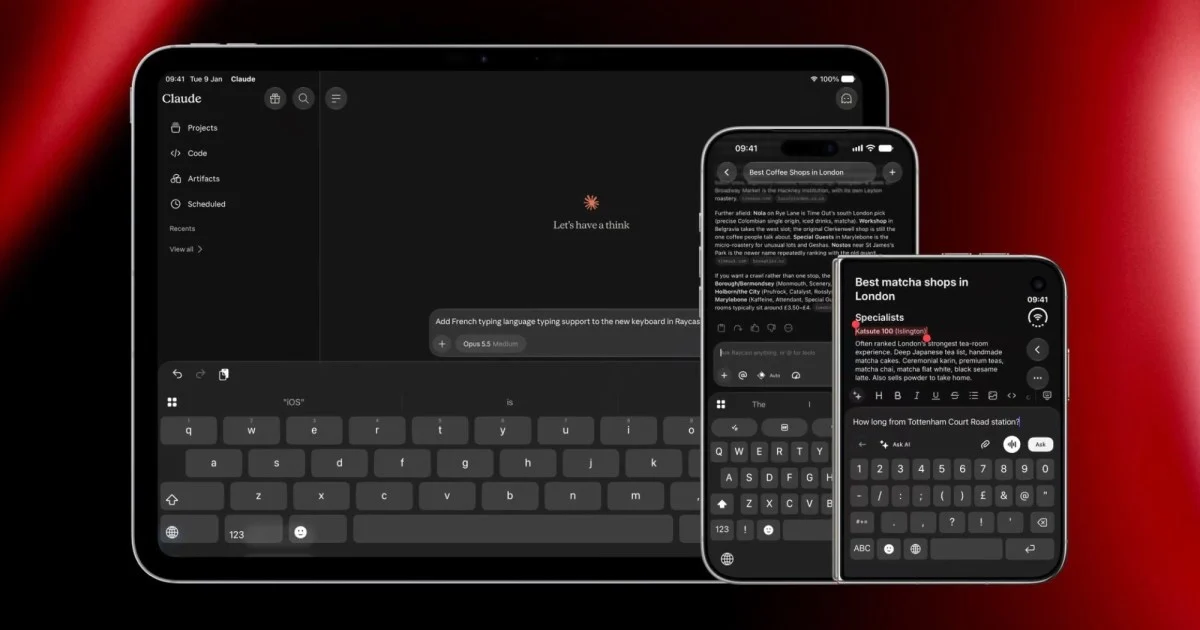
Raycast’s New iOS Keyboard: A Deeper Look at Enhanced Mobile Productivity
For years, smartphone keyboards have been largely the same: type, swipe, correct, and repeat. While functional, they often fall short of the productivity potential our mobile devices hold. Raycast, a company known for its powerful macOS productivity tools, has introduced a new primary keyboard for iOS that aims to change this. This isn’t just another keyboard app; it’s a significant step towards integrating advanced productivity features directly into your everyday typing experience without the need to switch between applications. The Raycast iOS keyboard promises to blend seamless typing with powerful AI commands, dictation, and quick access to information, all from a single interface.
This new keyboard is designed to be a true replacement for the native iPhone keyboard, offering familiar features like swipe typing and autocorrect while adding a layer of sophisticated functionality. The goal is to keep users in their flow, whether they are composing an email, sending a message, or searching for information. By bringing AI, dictation, and shortcuts directly to the keyboard, Raycast is attempting to redefine what a mobile keyboard can be. This analysis will explore the capabilities, potential benefits, and limitations of the Raycast iOS keyboard, examining how it stacks up against traditional typing methods and what it means for mobile productivity.
Understanding the Core Functionality of the Raycast iOS Keyboard
The Raycast iOS keyboard is built on the idea that your keyboard should be a central hub for productivity, not just a passive tool for input. Unlike its predecessor, which functioned as a secondary keyboard requiring users to switch to it for specific features, the new primary keyboard integrates seamlessly into the existing iOS typing experience. This means you can enjoy the full functionality of swipe typing and autocorrect, just as you would with Apple’s native keyboard, but with a host of additional tools readily available.
One of the standout features is its advanced dictation capability. The Raycast keyboard pulls dictation styles directly from its Mac application, offering a refined voice-to-text experience. This is particularly useful for users who prefer speaking their messages or notes, allowing for faster input and greater accuracy. The integration of dictation directly into the primary keyboard means you no longer need to tap a separate microphone icon and wait for a different interface to load.
Beyond dictation, the keyboard offers robust text expansion capabilities through snippets. Users can define a prefix character that, when followed by a short code, automatically expands into a longer, pre-saved piece of text. This is incredibly useful for frequently used phrases, email sign-offs, or even complex code snippets. Similarly, Quicklinks allow for on-the-fly insertion of information, streamlining workflows that involve repetitive data entry or referencing.
The keyboard also features a customizable action row. This row can be populated with frequently used AI commands, allowing users to trigger complex tasks with a simple tap. Imagine asking an AI to summarize a piece of text, rephrase a sentence, or generate an idea, all without leaving your current application. This direct access to AI capabilities is a significant departure from traditional keyboard functionality and positions the Raycast keyboard as a powerful productivity enhancer.
Furthermore, the Raycast keyboard includes smart emoji search and GIF search. These features make it easier and faster to find and insert the perfect emoji or GIF into your conversations, adding a layer of expressiveness and fun to your mobile communication. The inclusion of five different visual themes, including one that mimics Raycast’s mechanical keyboard, adds a touch of personalization and aesthetic appeal, allowing users to customize the look and feel of their typing experience.
Seamless Integration: The “No More Keyboard Switching” Promise
The most significant advancement of Raycast’s new iOS keyboard is its ability to function as a primary input method without requiring users to switch to a different keyboard for its advanced features. This addresses a major pain point for users who have tried third-party keyboards in the past. Often, these keyboards offered unique functionalities but necessitated a cumbersome process of switching back and forth between the native keyboard and the third-party option. This constant switching disrupts workflow and can be frustrating.
Raycast’s approach is different. By making its keyboard the primary one, it ensures that all the familiar typing functions—like swipe typing and autocorrect—are present and perform as expected. This familiarity is crucial for user adoption. People are accustomed to how their native keyboard works, and any new keyboard needs to meet that baseline expectation before it can introduce new features. The Raycast keyboard achieves this by essentially layering its advanced tools on top of a solid, familiar typing foundation.
The benefit of this seamless integration is a more fluid and efficient user experience. When you need to dictate, use an AI command, or insert a snippet, you don’t have to leave the app you’re in or navigate through multiple menus. Everything is accessible directly from the keyboard interface. This reduction in friction is key to unlocking true productivity gains on a mobile device. Instead of thinking about the tools you need to use, you can focus on the content you are creating.
This “no more switching” philosophy extends to how the keyboard handles its various functions. For example, the AI commands are not hidden behind a separate menu. They can be placed in the customizable action row, making them as accessible as a punctuation mark. Similarly, snippet expansion is triggered by a simple prefix, and Quicklinks can be inserted with minimal effort. This design choice prioritizes speed and ease of use, ensuring that the advanced features are not just available but also practical for everyday use.
The implications of this integrated approach are far-reaching. For professionals who rely heavily on their iPhones for communication and work, the ability to perform complex actions without interrupting their flow can lead to significant time savings. For students, it can make note-taking and essay writing more efficient. For anyone who uses their phone extensively, the Raycast keyboard offers a way to interact with their device more powerfully and intuitively. It transforms the keyboard from a simple input device into an active productivity tool.
Advanced Features for Enhanced Mobile Workflows
The Raycast iOS keyboard goes beyond basic typing to offer a suite of advanced features designed to enhance mobile workflows. These tools are not just novelties; they are practical additions that can significantly speed up common tasks and unlock new possibilities for mobile productivity.
1. AI Commands and Quick Fix:
This is arguably the most transformative feature. The keyboard allows users to access AI commands directly. This means you can perform actions like summarizing text, rephrasing sentences, checking grammar, or even generating creative content without leaving the app you are currently using. The “Quick Fix” functionality, likely a subset of AI commands, suggests improvements or corrections to your text, acting as an intelligent proofreader. This capability is invaluable for anyone who writes regularly on their phone, ensuring polished and effective communication. Imagine drafting an email and being able to instantly ask an AI to make it more concise or professional, all from the keyboard itself.
2. Snippet Expansion and Quicklinks:
Snippet expansion is a powerful time-saver. Users can create custom shortcuts for frequently used phrases or sentences. For instance, typing “sig” could automatically expand to your full email signature, or “addr” could expand to your home address. This eliminates the need to repeatedly type out the same information. Quicklinks serve a similar purpose but might be more dynamic, allowing for the insertion of specific data or links on the fly. This feature is particularly useful for tasks involving data entry, customer service responses, or sharing common information.
3. Advanced Dictation:
While iOS has its own dictation feature, Raycast aims to improve upon it. The keyboard pulls dictation styles from its Mac application, suggesting a more refined and potentially more accurate voice-to-text experience. The ability to dictate with styles pulled from the Mac means consistency across devices and potentially better recognition of specific tones or formats. This is a boon for users who prefer dictation for longer texts or when their hands are otherwise occupied.
4. Smart Emoji and GIF Search:
Finding the right emoji or GIF can sometimes be a hunt. Raycast’s smart search aims to make this process more intuitive. By understanding context or offering predictive suggestions, it can help users quickly locate and insert the perfect visual element to enhance their messages. This adds a layer of expressiveness and engagement to mobile communication without slowing down the typing process.
5. Customizable Action Row:
The action row at the top of the keyboard is fully customizable. Users can populate it with their most frequently used AI commands, snippets, or other shortcuts. This personalized row ensures that the tools you rely on most are always just a tap away. This level of customization allows users to tailor the keyboard to their specific needs and workflows, maximizing efficiency.
6. Thematic Customization:
While not strictly a productivity feature, the inclusion of five visual themes, including a mechanical keyboard-inspired design, adds a personal touch. This allows users to customize the aesthetic of their keyboard, making the daily interaction with their device more enjoyable. For users who spend a significant amount of time typing, having a visually appealing interface can contribute to a better overall experience.
These advanced features collectively transform the Raycast iOS keyboard from a simple input tool into a dynamic productivity hub. By integrating these capabilities directly into the typing interface, Raycast empowers users to accomplish more on their iPhones with greater speed and efficiency.
Potential Limitations and Considerations
While the Raycast iOS keyboard offers a compelling set of advanced features, it’s important to acknowledge its current limitations and consider potential challenges for users. Understanding these aspects will help set realistic expectations and guide users in deciding if the keyboard is the right fit for their needs.
1. Language Support:
Currently, the keyboard operates in English only. While support for more languages is reportedly in progress, this is a significant limitation for non-English speakers. For users who communicate in multiple languages or primarily in a language other than English, this restriction means the keyboard cannot fully replace their native input method. The pace at which additional language support is rolled out will be a key factor in its broader adoption.
2. Dictation Transition Quirk:
Apple’s security and privacy protocols require third-party keyboards to briefly jump into their own app before returning to the user’s current application when certain functions, like dictation, are activated. Raycast has worked to make this transition as fast as possible, but it is still a momentary interruption. For users who dictate very frequently, this brief switch might still be noticeable and could potentially disrupt the flow of continuous speech input. The option to “keep the mic warm longer” in settings is a thoughtful addition to mitigate this, but the underlying technical requirement remains.
3. Learning Curve:
While the keyboard aims for seamless integration, mastering all its advanced features, such as creating effective snippets, configuring AI commands, and optimizing the action row, will require some initial effort. Users accustomed to a basic typing experience will need to invest time in learning how to best utilize these powerful tools. The benefit is substantial, but it comes with a small learning curve.
4. Battery Consumption:
As with any application that runs continuously in the background and performs complex operations, there’s a potential for increased battery consumption. While developers typically optimize these aspects, users who are highly sensitive to battery life might want to monitor their device’s performance after installing and extensively using the keyboard.
5. Dependence on Raycast Ecosystem (Potential):
While the keyboard is designed to work standalone, its most powerful features, particularly AI commands, might be more deeply integrated or offer greater functionality when used in conjunction with other Raycast products or services. Users who are not already invested in the Raycast ecosystem might find some AI features less compelling or require additional setup compared to users who are familiar with Raycast’s broader offerings. However, the core typing and snippet features are designed to be universally useful.
6. App Updates and Compatibility:
Like all software, the keyboard will require updates for bug fixes, new features, and compatibility with future iOS versions. Users will need to ensure they are running the latest version of the Raycast app (version 1.1.0 or later) to access the new keyboard and its improvements. This is a standard consideration for any app but worth noting for users who prefer to avoid frequent updates.
Despite these limitations, the Raycast iOS keyboard represents a significant step forward in mobile productivity. The developers are actively working on expanding language support, and the core functionality addresses many of the frustrations users have with existing keyboards. For many, the benefits of integrated AI, dictation, and text expansion will likely outweigh the current drawbacks.
Raycast’s Vision for Mobile Productivity
Raycast’s foray into the iOS keyboard space is more than just an expansion of their product line; it’s a clear statement about their vision for productivity. The company has already established itself as a leader in desktop productivity with its macOS application, which acts as a command center for launching apps, searching files, and executing custom scripts. The development of a primary iOS keyboard is a natural extension of this philosophy, aiming to bring a similar level of efficiency and power to the mobile environment.
The core of Raycast’s vision is to reduce friction and eliminate context switching. On a desktop, this means having a single interface to access a multitude of tools and information. On a mobile device, where screen real estate is limited and multitasking can be more challenging, this principle becomes even more critical. By embedding advanced features directly into the keyboard, Raycast is essentially making the keyboard the central point of interaction for many common tasks. This approach acknowledges that users spend a significant amount of time typing on their phones and seeks to make that time more productive.
The emphasis on AI integration is particularly telling. Raycast sees AI not as a separate tool to be invoked but as an inherent capability that should be readily available. The ability to use AI commands for tasks like summarization, rephrasing, or content generation directly within any app transforms the mobile device into a more intelligent assistant. This aligns with the broader trend of AI becoming more deeply integrated into everyday software, making powerful capabilities accessible to a wider audience.
Furthermore, Raycast’s focus on customization and personalization is evident in features like the customizable action row and the visual themes. This suggests a belief that productivity tools should adapt to the user, rather than the user having to adapt to the tool. By allowing users to tailor the keyboard to their specific workflows and aesthetic preferences, Raycast aims to create a more engaging and efficient user experience.
The company’s iterative approach, starting with a secondary keyboard and evolving to a primary one, also indicates a commitment to refining their offerings based on user feedback and technological advancements. The transition to a primary keyboard signifies a confidence in their ability to match the native iOS experience while offering superior functionality.
Ultimately, Raycast’s vision for mobile productivity is about empowering users to do more with their iPhones, faster and more intuitively. It’s about transforming a basic input device into a powerful command center that streamlines workflows, enhances communication, and unlocks new possibilities through the intelligent integration of AI and productivity tools. This ambitious goal positions Raycast as a key player in the ongoing evolution of mobile computing.
How Raycast’s Keyboard Compares to Alternatives
When evaluating the Raycast iOS keyboard, it’s helpful to compare it against the native iOS keyboard and other popular third-party keyboard applications. This comparison highlights Raycast’s unique value proposition and where it stands in the competitive landscape.
1. Native iOS Keyboard:
Apple’s native keyboard is known for its simplicity, reliability, and deep integration with the iOS ecosystem. It offers excellent swipe typing, robust autocorrect, and basic dictation. Its strengths lie in its seamless performance and ease of use for everyday tasks. However, it lacks the advanced productivity features that Raycast provides. There are no integrated AI commands, no sophisticated snippet expansion beyond basic text replacement, and no quick access to GIF or smart emoji search beyond what the system offers. For users who prioritize a no-frills, highly reliable typing experience and don’t require advanced features, the native keyboard remains a strong contender. Raycast aims to offer everything the native keyboard does, plus significantly more.
2. Other Third-Party Keyboards (e.g., Gboard, SwiftKey):
Keyboards like Google’s Gboard and Microsoft’s SwiftKey have long been popular alternatives, offering features such as enhanced search capabilities (Google Search integration in Gboard), multilingual typing, GIF keyboards, and advanced theme customization. Gboard, in particular, offers a built-in translator and Google Assistant integration, which can be useful. SwiftKey is known for its predictive text and learning capabilities.
While these keyboards offer valuable additions, they often still require users to switch between keyboards for certain functions or lack the deep integration of AI commands that Raycast provides. For instance, while Gboard might offer Google Assistant, it’s not the same as having AI commands directly accessible for text manipulation or content generation within any app. Furthermore, the “no more switching” promise is where Raycast truly differentiates itself. Many third-party keyboards, while feature-rich, still necessitate a conscious decision to switch to them for their unique benefits, disrupting the typing flow. Raycast’s primary keyboard design aims to eliminate this disruption entirely.
3. Specialized Productivity Keyboards:
There might be other niche keyboards focused on specific productivity tasks, such as coding or specialized data entry. These often offer highly tailored features for their target audience. However, they typically lack the broad appeal and general-purpose productivity enhancements that Raycast brings. Raycast aims to be a universal productivity enhancer, applicable to a wide range of users and tasks, from casual messaging to professional communication and content creation.
Raycast’s Differentiating Factors:
- Primary Keyboard Integration: The most significant differentiator is its function as a primary keyboard that doesn’t require switching for its advanced features.
- Deep AI Integration: Direct access to AI commands for text manipulation, summarization, and generation is a unique and powerful offering.
- Unified Workflow: Combining dictation, AI, snippets, and typing into a single interface minimizes context switching and maximizes efficiency.
- Raycast Ecosystem Synergy: While functional standalone, it complements the broader Raycast suite of productivity tools, offering a cohesive experience for existing users.
In essence, Raycast’s keyboard is not just another alternative; it’s an attempt to redefine the mobile keyboard experience by making it an active participant in productivity rather than a passive input tool. It targets users who are looking to maximize their efficiency on their iPhones and are willing to adopt a new primary keyboard to achieve that goal.
Conclusion
The introduction of Raycast’s primary iOS keyboard marks a significant evolution in mobile input and productivity. By seamlessly integrating advanced features like AI commands, enhanced dictation, snippet expansion, and smart search directly into the typing interface, Raycast addresses a long-standing need for more efficient and less disruptive mobile workflows. The promise of “no more keyboard switching” is a powerful one, offering users the ability to perform complex tasks without leaving their current application, thereby preserving focus and saving valuable time.
While current limitations such as English-only support and the minor dictation transition quirk exist, the core functionality and the vision behind the Raycast keyboard are compelling. It transforms the humble keyboard from a simple text entry tool into a dynamic productivity hub, aligning with the broader trend of making powerful computing capabilities more accessible and integrated into our daily digital interactions. For users seeking to unlock greater efficiency on their iPhones, the Raycast keyboard presents a promising and innovative solution that redefines the boundaries of mobile productivity.



Conversation
0 Comments